Who hasn’t seen this? The jumping dino shows up the moment your Wi-Fi drops.
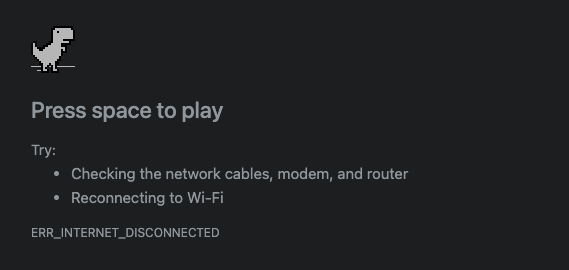
I’ve played it plenty of times myself, out of boredom more than anything.
I kept wondering if I could automate it. It’s a simple game - no complicated logic needed. The idea showed up in my head a couple of years back. I even worked out the approach in my head at the time. I just never sat down and built it.
This year I finally did.
Beyond the fun of automating a game, I wanted an excuse to learn how to drive input devices - keyboard and mouse - from code. I’ve got a few other projects on the horizon where that skill will come in handy.
Design
The design was simple: if we detect an obstacle, jump. That’s the whole idea.
Unpacking that took a bit more thought:
- What does “detect an obstacle” actually mean?
- How far ahead do we need to see it?
- How fast does the jump command need to fire?
I also wanted to start the game with as little input from me as possible - a couple of clicks, nothing more. So the real question was how the program would know when to start. I could run the program, and let it wait for me to tell it when to go.
“Tell it to start” still needed a definition. Should it scan my screen for the game? Hunt through Chrome tabs to find it? Open a new tab and load it itself? I decided against all of that for this:
- Run the program.
- Click on the dinosaur.
- It starts playing.
I run dual monitors at home, so that click also told the program which screen the game was on.
Detecting when to jump
Once I had the dinosaur’s coordinates, the rest fell out of that. The good part: I don’t need to look at the whole screen to dodge obstacles. I only need to watch a handful of pixels. If they change color, the program reacts. Those pixels sit close to the dinosaur, near the point I clicked.
Getting to the right set of pixels was trial and error - a lot of it. I narrowed it down to three things to watch, shown in the image above.
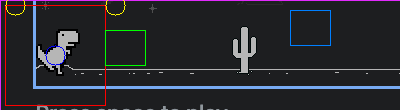
- Two pixels near the top tell us day or night. White means daytime, dark means nighttime. This matters because the game flips the dinosaur and obstacle colors when the mode switches.
- A green box just above the ground catches all obstacles, including the flying pterodactyls.
- A box further down watches for the restart button, which only shows up once the game is over.
How I built it
The first real question was which library could detect screen changes fast enough. The game speeds up as it goes, so if detection lags, the whole thing falls apart.
I landed on MSS. It grabs a screenshot of the whole screen, but I only care about the small game area, so I crop down to just that region - the same area that holds the three points I’m watching. Cropping early means every loop is processing a tiny slice of the screen instead of the whole thing, which matters a lot when you’re doing it dozens of times a second.
For input, I used pynput to control the mouse and keyboard. At the start, I move the mouse back to the point I clicked on the dinosaur, just to make sure the game window has focus. From there, every time an obstacle shows up in the watched pixels, I fire a Space key-press to jump.
Once those two pieces were in place, the rest was straightforward:
- Ask the user to click the dinosaur - that tells us which screen the game is on.
- Crop the screen down to the small playable area around that click.
- Check whether the browser is in dark or light mode, since the game starts in whichever mode the browser is in.
- Mark the box just above the ground where obstacles get detected.
- Find the coordinates of the game-over button.
- Start the game.
What it doesn’t do
Here’s a quick recording of it playing the game.
Accuracy depends a lot on exactly where you click the dinosaur. Off to either side, even slightly, and the errors compound until the game ends. I got it stable enough to keep running, and my best score sits a little above 7000.
This was an excuse to learn MSS and pynput and dust off some old CV2 knowledge, nothing more. I don’t plan to optimize it further - it does what I set out to make it do.
You’re welcome to poke at it and bend it to your own use.
Here’s the repo - https://github.com/jerrymannel/game-chrome-dino-game